Appearance
C.5: Session Details
Summary
Session Details shows the full meeting record for a client-accessible session, including participants, schedule, recurrence, linked session information, meeting link, outcome notes, downloadable meeting items, post-call processing status, and the meeting notes document.
Role
- Primary: Client
- Secondary: Counselor, System
Entry Point
- URL:
/sessions/:sessionId - Navigation: My Sessions -> session card
- Calendar: event side panel -> View Details
- Dashboard: upcoming session card -> View Details
Preconditions
- Authenticated: yes
- Required role:
client - Client must be authorized to view the meeting
Steps
- Client opens
/sessions/:sessionId. - System loads meeting details.
- System loads current user and meeting notes for the meeting.
- Page renders status, recurrence, title, participants, date/time/duration, meeting description, linked session, and meeting link.
- If the meeting is scheduled or in progress, client can open the meeting room at
/meeting/:meetingId. - Client reviews the meeting summary and downloads available meeting items, such as recording and transcript files.
- Client reviews or interacts with the meeting notes document area.
- Client can return to
/sessionsfrom the not-found state or by browser/navigation controls.
Diagram
Edge Cases
- Loading: Page shows a full-layout spinner.
- Not found or unauthorized: Page shows a not-found message with a Back to Sessions button.
- Missing schedule data: Date/time fields fall back to "not set" labels.
- Missing description, link, outcome, recording, or transcript file: The page renders explicit fallback text.
- Host-only actions: Edit, cancel recurring, start, and end actions are available only when current-user/host checks pass. Clients normally see join/read actions for their accessible sessions.
- Linked library session: The current UI can navigate to
/library/sessions/:idfor linked session details; that route is feature restricted and may not be available to clients.
Screenshot Status
- Captured with Playwright using deterministic mock data:
- In-progress client meeting details:
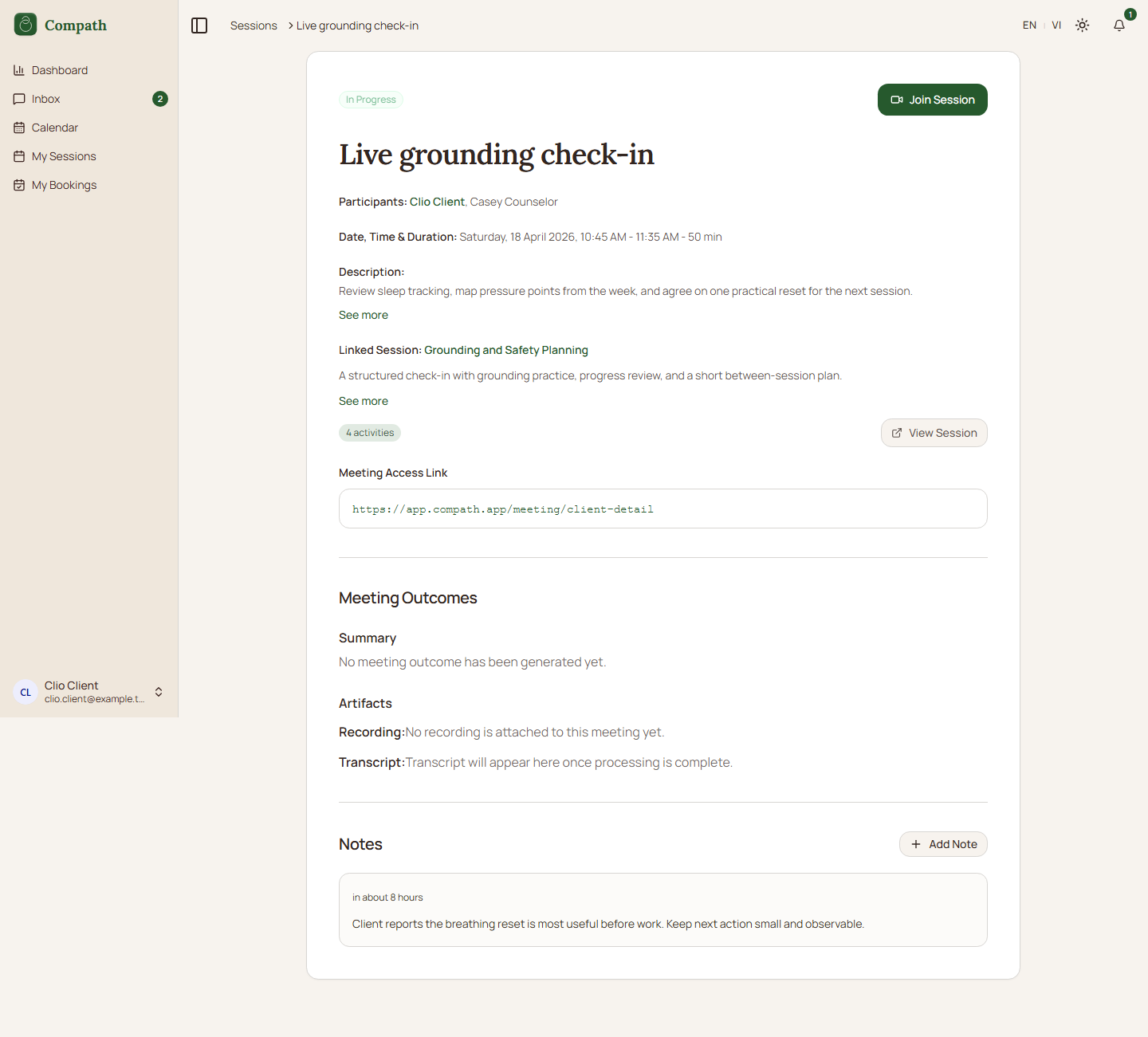
- In-progress client meeting details: