Appearance
CO.6: Session/Meeting Details
Summary
Counselors view a meeting detail page with meeting metadata, participant/client context, linked session content, notes, documents, and meeting actions.
Role
- Primary: Counselor
Entry Point
- URL:
/sessions/:sessionId - From sessions list, calendar, dashboard, or client detail.
Preconditions
- User is authenticated and has access to the meeting.
Steps
- Counselor opens a meeting details route.
- Frontend loads meeting detail data.
- Page shows time, status, participants, relationship/client details, and linked session content.
- Counselor can schedule/update meeting data where allowed.
- Counselor can navigate to the meeting room or linked library session.
Diagram
Edge Cases
- Missing meeting: Page shows not-found/error state.
- Access denied: Backend enforces host/invitee/relationship access.
- Route naming: Details route uses
/sessions/:sessionId; room route uses/meeting/:meetingId.
Current Implementation Notes
- Frontend:
frontend/src/app/pages/meeting-details.tsx - Backend:
backend/internal/services/meeting_service.go
Screenshot Status
- Captured with Playwright using deterministic mock data:
- Scheduled counselor meeting details with host actions:
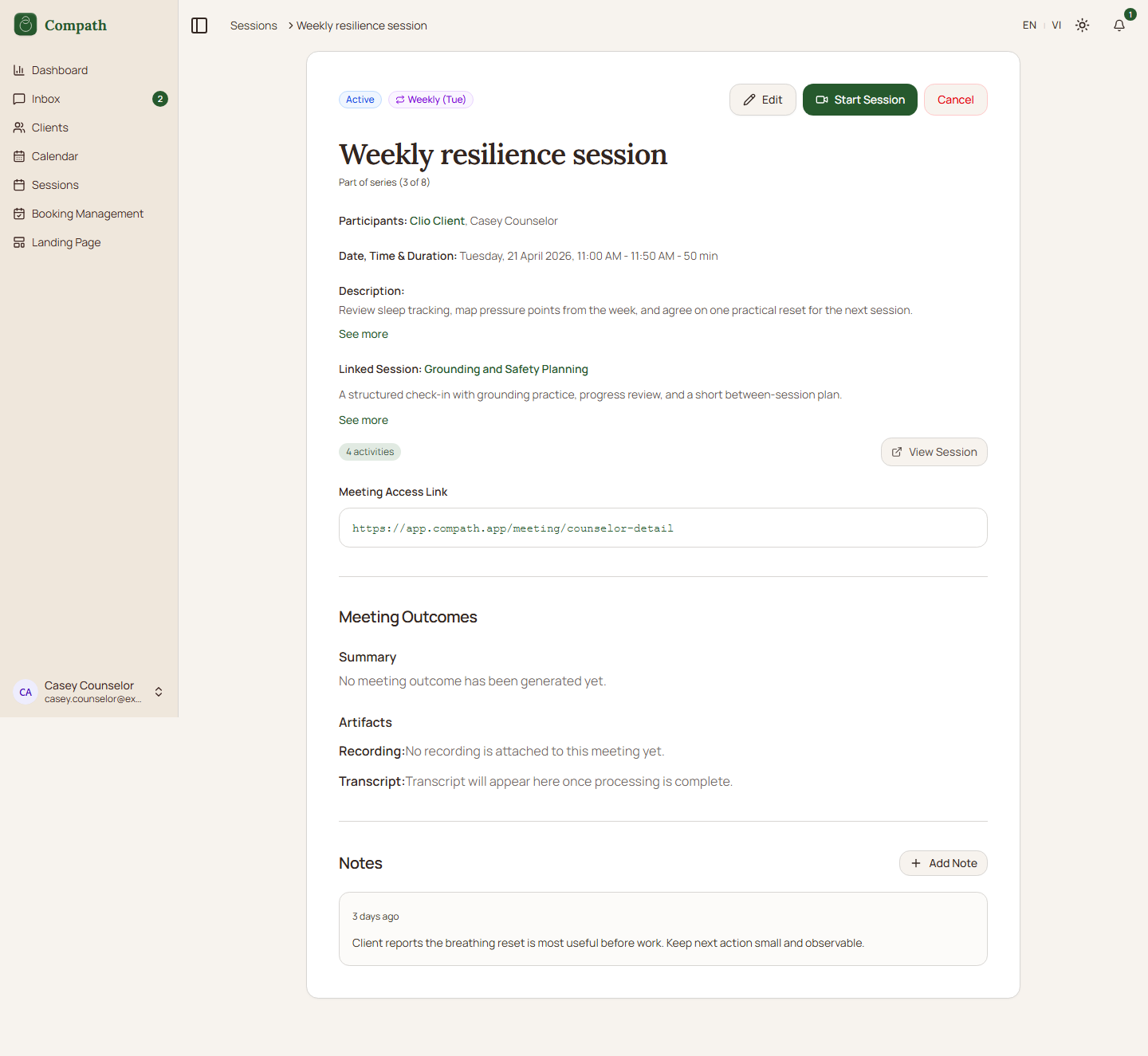
- Scheduled counselor meeting details with host actions: